
Find The Anomaly New Anomalies: Track Additions and Complete Your File
Learn how Find The Anomaly new anomalies fit the night-train loop, which in-game checks confirm suspects, and how updates expand the Anomaly File.
Find The Anomaly new anomalies are the reason a night-train run can feel different after an update: as of 2026-11-27, the official Find The Anomaly Roblox page asks players to like and favorite for new anomalies every update. That matters because discovery feeds the long-term goal—the same page lists 60+ anomalies and an Anomaly File to complete—so every addition is a fresh suspect to identify and a fresh discovery to verify. Hunting Find The Anomaly new anomalies is not about memorizing rumored names; it is about using the game’s confirmation loop, shooting only after you have checked a suspect, and learning how to read an update without inventing a roster.
What Find The Anomaly New Anomalies Mean in the Night-Train Loop
According to the official page reviewed on 2026-11-27, the loop has several layers: clear every wagon to reach the driver’s cabin, discover 60+ anomalies and complete your Anomaly File, unlock four endings, and earn titles, finish daily quests, and climb leaderboards. The description also asks players to like and favorite for new anomalies every update.
That gives Find The Anomaly new anomalies a specific meaning: additions to the anomaly pool that can appear on the night train. The public description lists the total but not individual anomaly names, so a social post that claims a specific name is not proof. Use your in-game Anomaly File to see what you have discovered, and use the official page to check the total and update language.
How Updates Expand the Anomaly Pool
Update language is stronger than rumor language. As of 2026-11-27, the official description advertises new anomalies every update, which makes an update—not a fixed calendar date—the trigger to watch. The reviewed page does not publish a release schedule, patch number, or named roster of additions. For Find The Anomaly new anomalies, that distinction matters: additions are described, but their names, timing, and behavior must come from verifiable in-game evidence rather than a comment thread.
A community-run Find The Anomaly Wiki page published 2026-11-25 mentions an update timeline, but its guide content centers on the base loop and identification tools rather than a named new-anomaly roster. That leaves the in-game Anomaly File as the practical record of what you have actually found.
A dated count has a job too. As of 2026-11-27, the official page uses “60+” rather than a complete list; do not inflate that figure with unverified names or treat a guide’s handful of examples as the full set.
Use the Taught Checks to Confirm a New Suspect
Community documentation published 2026-11-25 gives new players a repeatable sequence. The details below are community reports, not a substitute for what you observe on your run.
| Check | When it helps | What the community guide says |
|---|---|---|
| Arms count | Before firing on a suspicious passenger | Humans only have two arms; a passenger showing more is not human. |
| Ping | When you are unsure | Car two introduces the Ping; look at the passenger and use it when uncertain. |
| Scanner | When you need a second signal | A Scanner arrives in car four and beeps at anything that is not human. |
| Lights-out watch | From Wagon 6 onward | Passengers’ behavior in the dark is a clue. |
The checks do not change because a passenger is unfamiliar. A new anomaly report should still end with a confirmed non-human, not a guess. The 2026-11-27 official description warns that shooting the wrong passenger makes it come for you; community reports add that a correct shot displays “ANOMALY ELIMINATED” and opens the door ahead. Confirm, fire, and move toward the next wagon.
A Practical Route for Hunting Find The Anomaly New Anomalies
A reliable route for Find The Anomaly new anomalies starts with the same basics the game teaches, then adds a review step after the run.
- Start with a refresher. Board Line 0. The 2026-11-25 community guide says the Conductor’s tutorial rides with you and states the rule: one passenger in every car is not human.
- Use group communication. Bring up to three friends per four-player party, as shown in the November 28 Create Party capture, and speak your evidence aloud before anyone fires. The 2026-11-25 community guide lists a 20-player server cap, so a crowded train still needs individual confirmation.
- Clear every wagon. Reach the driver’s cabin. The community guide treats that as the endpoint of a run.
- Review your Anomaly File. The 2026-11-27 official page frames file completion as a goal; the community guide calls the file the discovery log for anomalies you identify.
- Do not chase a name before proof. A specific name is only useful when your file or an official update records it.
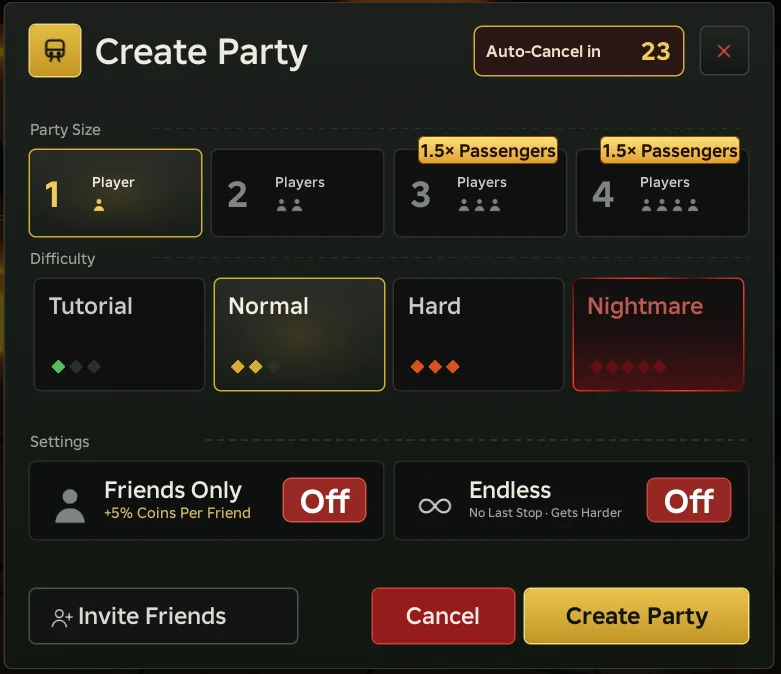
Daily quests, titles, and leaderboards add goals beyond a single sighting, but the official description makes the wrong shot a direct risk. Slower confirmation protects the run and gives your group a shared basis for accepting a new entry.
Group Play, Endings, and the Anomaly File
Group play is a strong fit for these sightings because several sets of eyes can cover different wagon details. As of 2026-11-27, the official description supports riding with up to four friends; the 2026-11-25 community guide lists a 20-player server capacity. If your group wants structure, split observation duties—arms, Ping, Scanner, and blackout behavior—then compare notes before firing.
Endings are a separate long-term goal described on the official page. Community documentation says clearing every wagon toward the driver’s cabin is the route that concludes a run. Do not confuse an ending unlock with an Anomaly File entry; the official page presents them as different rewards.
The Anomaly File remains the discovery record. A Find The Anomaly new anomaly matters when you can verify it and log the sighting. If you cannot confirm the passenger, treat the claim as an unconfirmed lead—not a completed entry.
Frequently Asked Questions About Find The Anomaly New Anomalies
Are there named Find The Anomaly new anomalies confirmed anywhere?
The official page reviewed on 2026-11-27 lists 60+ anomalies and invites players to watch for new anomalies every update, but its public description does not name individual additions. The community wiki page published 2026-11-25 focuses on the base loop. For a specific name, rely on what your in-game Anomaly File shows rather than an unverified comment.
How often do Find The Anomaly new anomalies arrive?
As of 2026-11-27, the official description says new anomalies every update, but the reviewed page gives no fixed release schedule. Watch for an update, then test the new pool in a run instead of assuming a weekly or monthly cadence.
What is the safest way to confirm a new suspect?
Community documentation from 2026-11-25 recommends counting arms, using Ping when unsure, sweeping with the Scanner from car four, and watching the lights-out moment from Wagon 6. Shoot only after confirmation; shooting the wrong passenger brings the anomaly after you.
Can I hunt Find The Anomaly new anomalies with friends?
Yes. As of 2026-11-27, the official description supports up to four friends, and the 2026-11-25 community guide lists 20-player servers. Group play can divide observation work, but each player should still confirm a suspect before firing.
Related Guides
Find The Anomaly All Anomalies: What the Public Record Covers
What the public record covers on Find The Anomaly all anomalies: the taught checks, the community cue families, and how the in-game Anomaly File records your discoveries.
Find The Anomaly Anomaly Count: How Many Anomalies Are in the File?
The Find The Anomaly anomaly count explained: the 60+ Anomaly File catalog, four endings, and how to track your own discoveries.
Find The Anomaly Anomaly File Guide: Complete All 60+ Entries
Learn how the Find The Anomaly anomaly file tracks discoveries, how to log clean entries with cue families, and what UPDATE 1 may add.
Find The Anomaly How to Spot Anomalies: Arms, PING, and Scanner Guide
Learn how to spot anomalies in Find The Anomaly using arm counting, PING checks, and the Scanner, then confirm before you shoot.