
Find The Anomaly Anomaly File Guide: Complete All 60+ Entries
Learn how the Find The Anomaly anomaly file tracks discoveries, how to log clean entries with cue families, and what UPDATE 1 may add.
Every night-train run in Find The Anomaly ends with the same uncomfortable question: which passenger in this wagon is not human? The Find The Anomaly anomaly file is what turns those one-off clears into a long-term record — a discovery ledger of the anomalies you have actually confirmed. As of 2026-11-27, the official Find The Anomaly page on Roblox lists 60+ anomalies to discover and complete your Anomaly File, alongside 4 endings, titles, daily quests and leaderboards.
That matters because a lucky shot can end your run, while a logged discovery stays with you across every future session. This guide breaks down how the Find The Anomaly anomaly file works, how to fill it without guessing, and how to leave room for the anomalies that patches will add.
What the Find The Anomaly Anomaly File Actually Tracks
A single wagon clear tests your eyes. The Find The Anomaly anomaly file tests your memory. According to the community-maintained Find The Anomaly wiki's anomaly file guide, the File is the game's long-term collection layer: it rewards attention across many sessions instead of one lucky cabin clear.
The same fan wiki — which states it is not affiliated with Roblox or the developers — names the studio behind the experience as Rick X Coda and describes the catalog as 60+ anomalies. It also notes how the File pairs with progression badges:
- All Aboard — awarded for boarding Line 0 on your first train.
- Not Human — awarded for your first anomaly elimination.
- End of the Line — awarded for reaching the driver's cabin.
Those short-term milestones and the File serve different purposes. Clearing wagons proves route mastery; filling the File proves breadth. You can reach the driver's cabin while still missing dozens of entries if you always take the same safe reads.
One useful discipline the wiki enforces: it refuses to publish an A–Z list of anomaly names, arguing that if the in-game File displays a string, that string is canonical. Treat any social-media spreadsheet of entry names as unverified until you see it inside your own File.
How Discoveries Usually Happen
The community wiki lays out a repeatable loop for logging new entries without gambling on a shotgun guess:
- Board Line 0, which also starts progress toward All Aboard.
- Clear each wagon by checking arms, then reflections, then poses, then behavior, with the optional scanner as a final confirmation.
- If you misidentify a passenger, survive the penalty that follows a wrong shot.
- Note any silhouette, glass failure or behavior tick you have not logged before.
- Re-open the File between sessions so the pattern sticks, not just the panic.
The official listing is explicit about the cost of a bad call: shoot the wrong passenger and it comes for you. That is the practical reason the File rewards confirmation over reflex.
| Cue family | What you are checking | File-friendly habit |
|---|---|---|
| Arms | limb counts and silhouettes that do not add up | Log obvious anatomy quickly, then move on |
| Reflections | mismatches across glass and mirrors | Run the glass check before declaring a clear |
| Poses | how a passenger holds position or moves | Slow down on contested seats instead of vibe-shooting |
| Behavior | small motion or timing tells | Watch a beat longer before firing |
| Scanner | Tutorial scans may be free; normal scans can cost Robux | Spend scans on low-confidence cases, not autopilot |
A Discovery-Night Loop That Fills the File
Speed runs and File progress are different skills. The wiki recommends deliberately mixing session types rather than grinding one pattern:
- Cabin-push nights aimed at reaching the driver's cabin.
- Discovery nights where you linger on contested seats and accept slower clears.
- Ending nights spent chasing the four endings the official listing advertises.
Solo play still works if you slow down and refuse vibe shots. Co-op helps because four sets of eyes catch different anomaly families — the official page supports riding with up to four friends.
Keeping a simple record helps more than most players expect. The wiki suggests tracking new File entries per week, your wrong-shot rate on discovery nights versus speed nights, and how many scans you spend per new entry. Those three numbers tell you whether you are actually collecting or just rerunning the same safe route.
Tiers, Updates and Room for New Cards
Anomaly Tiers organize how dangerous or obvious a tell feels — they are not a spoiler encyclopedia. For collectors, the practical use is resource management:
- Log S-tier, obvious anatomy cases fast, then move on.
- Spend patience on mid-tier pose and glass puzzles, which tend to teach more File variety.
- Save scanner budget for subtle behavior cases.
- After each new discovery, ask which cue family gave it away so the memory sticks.
Then there is patch readiness. The fan wiki reported that public messaging for UPDATE 1 scheduled the patch for Friday, November 27, 2026, in a window announced around 10:00 AM, teasing "new cards, mode & more." For the Find The Anomaly anomaly file, that likely means new card presentations may register as fresh discoveries, the familiar 60+ count may climb, and a new mode may change how often certain entries appear — or gate some encounters entirely.
What the wiki pointedly refuses to do is invent card names, rarities or drop tables before launch, and that is the right stance. If you cannot see an entry in your own File, do not add it to a public list.
Co-op File Etiquette for Shared Progress
Four-player lobbies fill the Find The Anomaly anomaly file faster, but they also spoil faster. Community guidance from the wiki suggests a few habits:
- Call the tell family first ("reflection mismatch, window two") before naming the anomaly.
- Let newer players take the shot on an obvious confirm when the stakes are low.
- Avoid reading out a whole File page in public voice to players on their first night.
- Rotate who keeps discovery notes so one person is not the only archivist.
One official perk worth mentioning: the listing invites players to join the group for a free exclusive aura. It is cosmetic, but it is a low-effort extra while you grind entries.
Frequently Asked Questions About the Find The Anomaly Anomaly File
What exactly is the Find The Anomaly anomaly file? It is the in-game discovery record that logs the anomalies you have confirmed across sessions. The official listing describes the goal as discovering 60+ anomalies and completing your Anomaly File, and the fan wiki frames it as the game's long-term collection layer rather than a single-run objective.
How many entries do I need for completion? As of 2026-11-27, the official Roblox listing advertises 60+ anomalies, and the fan wiki works from that same 60+ band. That figure may rise: the wiki reported UPDATE 1 messaging teasing new cards and a new mode, so treat any fixed number as a snapshot rather than a permanent cap.
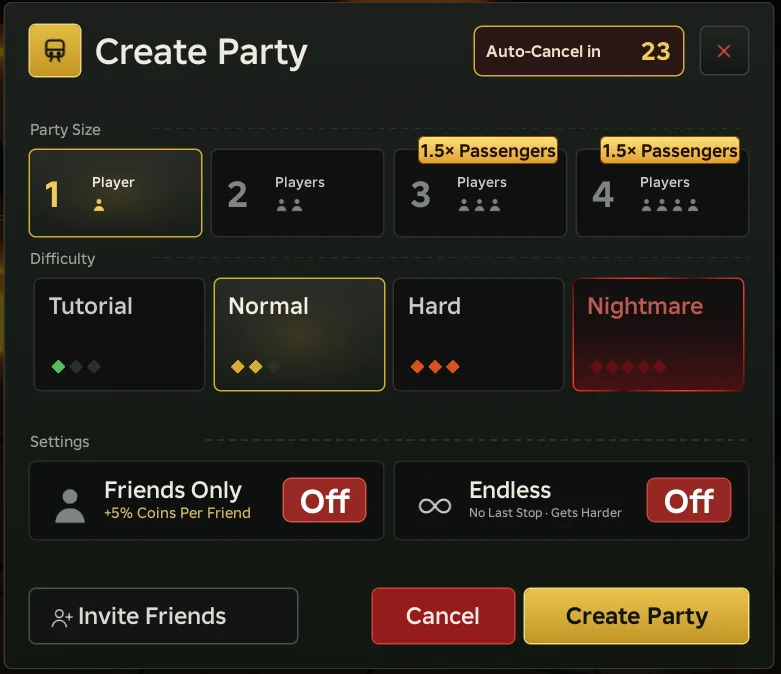
Can I fill the Find The Anomaly anomaly file solo? Yes. The wiki notes solo play works if you slow down and confirm before shooting, while co-op with up to three additional friends (four players total in the November 28 Create Party capture) gives you more eyes on different tell families. The trade-off is speed versus caution, not access.
Where should I check entry names and rarities? Your own in-game File is the canonical source. The Find The Anomaly wiki deliberately avoids publishing unverified name lists, and it also declined to invent card details before the UPDATE 1 launch window — so treat community graphics claiming a complete list with skepticism.
For live details, patch notes and the current feature list, check the official Find The Anomaly game page on Roblox directly rather than relying on this or any fan guide.
Related Guides
Find The Anomaly All Anomalies: What the Public Record Covers
What the public record covers on Find The Anomaly all anomalies: the taught checks, the community cue families, and how the in-game Anomaly File records your discoveries.
Find The Anomaly Anomaly Count: How Many Anomalies Are in the File?
The Find The Anomaly anomaly count explained: the 60+ Anomaly File catalog, four endings, and how to track your own discoveries.
Find The Anomaly How to Spot Anomalies: Arms, PING, and Scanner Guide
Learn how to spot anomalies in Find The Anomaly using arm counting, PING checks, and the Scanner, then confirm before you shoot.
Find The Anomaly New Anomalies: Track Additions and Complete Your File
Learn how Find The Anomaly new anomalies fit the night-train loop, which in-game checks confirm suspects, and how updates expand the Anomaly File.