Find The Anomaly Shooting Guide: Aim, Ping, and Fire Without Wasting Shots
Learn how Find The Anomaly shooting works: watch each wagon, Ping or scan, then fire only at the anomaly. Covers controls, wrong-shot risks, and tips.
Why Find The Anomaly Shooting Is a Test of Restraint
The Conductor's tutorial states the whole premise in a single rule: in every car, exactly one passenger is not human — find that passenger, aim, and shoot it. Because everyone else aboard is human, Find The Anomaly shooting is less about reflexes than about decisions. The walkthrough that documents this rule is blunt about the punishment for a bad shot: hit a human passenger and the anomaly comes after you. Your health sits on the HUD as two red hearts, so a careless trigger pull costs real ground.
That is why the same walkthrough compresses the discipline of Find The Anomaly shooting into one sentence: never fire on a guess. Watch the car, confirm with your tools, and shoot only the passenger you can defend.
The Per-Wagon Shooting Loop, Step by Step
Clear a wagon correctly and the door ahead opens; misread the car and the wagon keeps you. The loop repeats wagon after wagon, and it is the backbone of every Find The Anomaly shooting decision.
| Step | What you do | Why it matters for your shot |
|---|---|---|
| 1. Enter and watch | Read the wagon as you step in and watch how passengers sit, move, and idle | Builds a baseline for what "human" looks like in this car |
| 2. Check anyone you're unsure about | Look at the passenger and Ping; the Scanner backs you up | Turns a suspicion into a confirmation before you fire |
| 3. Aim and shoot the anomaly | Fire on the non-human passenger | A correct elimination is what opens the way forward |
| 4. Move through the open door | Walk into the next wagon and repeat | The run only advances wagon by wagon toward the front |
After a correct elimination, the game confirms the anomaly is eliminated and the door ahead is open. The HUD also carries a per-wagon "Next Wagon" timer, as the walkthrough notes, so the wagon's pace stays visible while you inspect seats.
Aiming, Firing, and Controls in Find The Anomaly Shooting
Exact keybinds follow your Roblox device settings, but the getting-started guide maps the actions the same way for everyone:
| Action | Purpose |
|---|---|
| Move / look | Inspect seats, aisles, and window glass |
| Interact / equip | Ready your weapon or tools |
| Fire / shoot | Eliminate the chosen passenger |
| Ping / scan | Probe or highlight a suspect; cost rules vary |
| Emote / chat | Callouts in co-op |
Two aiming habits improve Find The Anomaly shooting more than any sensitivity setting. First, practice aiming at empty space before you commit to a shot, which the getting-started guide recommends directly. Second, avoid panic hip-fire into a crowded bench; the same guide names that reflex as the usual origin of wrong shots. In practice, that means lining up the passenger you already confirmed instead of sweeping your aim across a row of seats and hoping.
One more geometry note from the walkthrough: the tutorial ride runs from Wagon 7 down to Wagon 2 as cars are cleared. That downward count is the train moving toward the front, where the driver's cabin waits — not a countdown of wagons left behind you.
Reading a Passenger Before You Pull the Trigger
Good Find The Anomaly shooting starts before your weapon comes up. The getting-started guide's first-anomaly checklist gives you an order to work through in every wagon.
Count arms
Humans have two. Extra limbs are the highest-priority tell and the fastest thing to verify in a crowded car.
Check reflections
Window glass that disagrees with the body is a major red flag. The guide lists ignoring windows entirely as a common beginner mistake, so build a glass check into every pass down the aisle.
Read poses
Illogical seating, distorted limbs, and frozen unnatural stares are all worth a second look before you aim.
Watch behavior
Delayed reactions, impossible social timing, and supernatural ticks are softer cues, but they often explain why a passenger felt wrong.
Confirm, then shoot
Especially in co-op, one wrong shot invites disaster. The Ping, taught in tutorial car two, is your one-passenger check when you're unsure; the Scanner, introduced in car four, is described by the Conductor as something that "beeps at anything that isn't human." Save scans for contested, subtle cases — the getting-started guide notes scanning can cost Robux in normal play and that the tutorial cart often lets you try a free tutorial scan, so don't burn a paid scan confirming an obvious extra arm.
From Your First Elimination to the Driver's Cabin
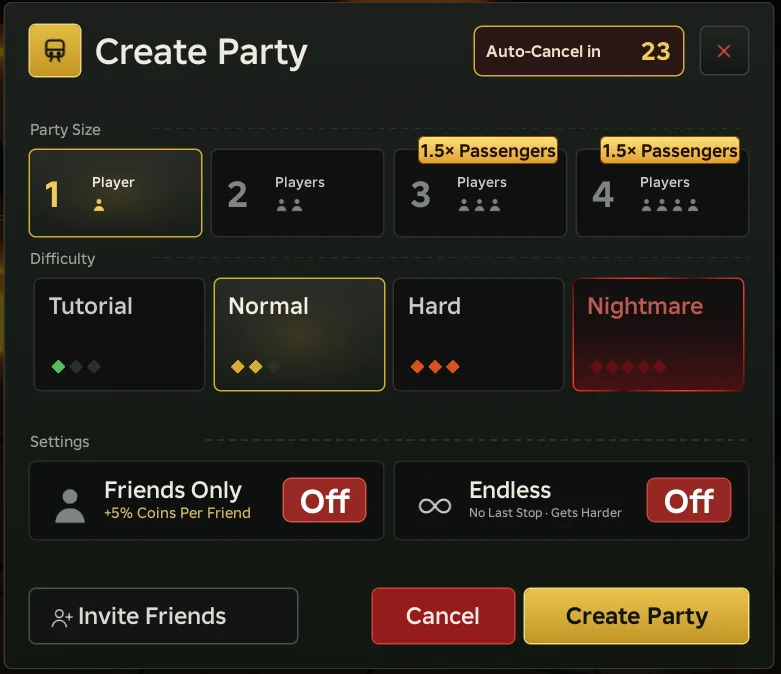
Correct Find The Anomaly shooting builds toward longer goals. The walkthrough lists official badges for boarding your first train on Line 0, eliminating your first anomaly, and reaching the driver's cabin, while the getting-started guide points to that same cabin goal under the End of the Line name and a Not Human badge for a first successful elimination. Behind those sit bigger targets: discover 60+ anomalies for the Anomaly File and unlock 4 different endings. The November 28 Create Party capture shows parties of up to four players total, making chat callouts useful in co-op.
If you want the full route rather than just the trigger discipline, the Find The Anomaly walkthrough covers the ride wagon by wagon. The official Find The Anomaly game page on Roblox is the primary source for current game information.
FAQ
Does a wrong shot end my run in Find The Anomaly shooting?
The walkthrough describes the penalty as the anomaly coming after you following a wrong shot, and your HUD health is two red hearts. Treat every wrong shot as a serious threat to the run, then reset your approach before the next wagon.
What is the difference between the Ping and the Scanner?
The Ping is a check you run on one uncertain passenger, taught in tutorial car two. The Scanner is a tool introduced in car four that beeps at anything that isn't human; outside the tutorial it can cost Robux, so save it for contested cases. Both exist to keep Find The Anomaly shooting honest.
How many players can join a run?
The November 28 Create Party capture shows one to four players total per train party, including the host. In co-op, the getting-started guide recommends narrating your checks — counting arms on a bench, calling out a window reflection — so nobody fires on a guess.
How many wagons do I have to shoot through?
A run is one push through the train: clear every wagon you meet and you reach the driver's cabin at the front. Along the way, the official targets are 60+ anomalies discovered for the Anomaly File and 4 endings unlocked.
Related Guides
Find The Anomaly Beginner Guide: Night Train Basics and First Runs
A practical Find The Anomaly beginner guide covering the Line 0 tutorial, Ping and Scanner checks, the per-wagon loop, and mistakes that cost runs.
Find The Anomaly Controls: Keybinds, Scanner Tips, and First-Run Guide
Learn Find The Anomaly controls, from movement and shooting to scanner pings, plus device setup, co-op callouts, and beginner mistakes to avoid.
Find The Anomaly Tips and Tricks: Spot Anomalies and Survive Every Wagon
Practical Find The Anomaly tips and tricks: run the Conductor's four spotting checks, budget your Scanner scans, and clear every wagon alive.
Find The Anomaly Walkthrough: Clear Every Wagon and Reach the Cabin
A practical Find The Anomaly walkthrough for Roblox: start on Line 0, use Ping and Scanner, clear wagons, and reach the driver's cabin.